



How the Ultrawide 30-inch Screen in the 2026 Buick Envision Simplifies Daily Drives around Boerne, TX
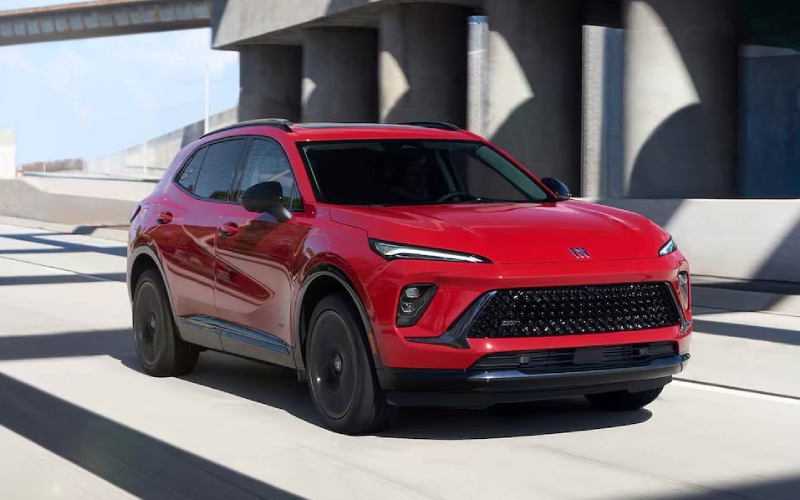
Ancira Buick – How the Ultrawide 30-inch Screen in the 2026 Buick Envision Simplifies Daily Drives around Boerne, TX
The 2026 Buick Envision puts an ultrawide 30-inch diagonal display front and center — the largest in its class — and the result is a simpler, calmer daily drive around Boerne, TX. Instead of juggling menus or switching between screens, the Envision gives you panoramic visibility for navigation, media, and vehicle settings that you can arrange intelligently. Maps live where your eyes already go, album art is detailed without distraction, and core vehicle controls sit within natural reach. With Google built-in, your voice becomes the most convenient interface in traffic — call up alternate routes, send a message, or cue your next playlist without digging into your phone. The layout is crisp in bright daylight and easy on the eyes after sunset, and Buick’s QuietTuning® with Active Noise Cancellation helps the screen’s clarity stand out in a cabin tuned for peace.
In practice, that big screen does more than look impressive — it saves steps. High-speed data, smooth animations, and thoughtful UI design help you get where you need to go with fewer taps and less time looking away from the road. It’s an approach that pairs beautifully with an available Head-Up Display for essential speed and guidance data, and with an available Bose 9-speaker premium audio system that sounds as high-definition as the graphics look. Whether you’re slipping onto I-10 for a quick run to San Antonio or picking a scenic route past Joshua Springs Park, the Envision’s interface leaves room for what matters — the road ahead.
- Split-view customization: Arrange navigation, media, and vehicle info side by side to reduce toggling.
- Natural voice commands: Use Google built-in to search, navigate, message, and control compatible apps hands-free.
- Smartphone continuity: Keep your phone in your pocket while the system handles your essentials.
- Night-friendly visuals: Rich contrast and adaptive brightness reduce eye strain after dark.
Drivers often ask how the display works when you’re busy. The simple answer is that the Envision anticipates multitasking without creating screen chaos. The split-screen capability helps you keep full-width maps open while managing a call or adjusting audio, and the quick-access bar anchors the settings you use most. If you share the SUV with a partner, user profiles store your preferred layouts and seat positions on select trims, so setup is seamless from the first start of the day.
Safety integration is equally thoughtful. Lane guidance and turn prompts appear exactly where you expect them, letting you plan moves earlier and more confidently. When paired with standard driver assistance features like Blind Zone Steering Assist, Front Pedestrian and Bicyclist Braking, and Rear Cross Traffic Braking, the visual cues and audible alerts feel coordinated rather than competing for attention. That sense of harmony extends to the rest of the cabin — 126-color ambient lighting allows you to set the tone for a late commute or a weekend run down Scenic Loop Road, all without washing out the display.
If you’re coming from a smaller screen or a system that hides key menus, the difference is immediate on your first drive. Start with a quick layout, set your favorite navigation view, and link your Google Account to enable personalized recommendations. The Envision remembers the flow you like and keeps it consistent every time you start the SUV. And with standard intelligent all-wheel drive across trims, the screen’s clarity pairs with confident control in sudden Hill Country showers or on gravel lanes outside the neighborhood.
Want to see it in action and try a side-by-side of layout options? Schedule a test drive and bring your daily routine with you — your typical podcast, your go-to coffee stop, even your split-view preferences. At the dealership, our team can walk you through setting up profiles, optimizing the quick-access bar, and using voice commands for common tasks you’ll use every day. One lap around Boerne confirms it — the biggest screen is not just about size, it’s about making every drive feel smoother. Ancira Buick GMC is proudly serving Laredo, Boerne, and Fair Oaks and can help you tailor the Envision’s tech to your life, from your first setup to your first road trip.
Frequently Asked Questions:
Is the 30-inch screen standard on every 2026 Envision?
Yes. The ultrawide 30-inch diagonal display is standard, giving every trim the same expansive foundation for navigation, media, and vehicle settings.
Do I need a specific phone to use Google built-in?
No. Google built-in runs natively in the Envision so you can sign in and use compatible apps and services directly on the vehicle’s system.
Can I set custom layouts for different drivers?
On select trims, memory settings store seat positions, mirrors, and display preferences so your setup returns automatically when you start the SUV.
Does the large screen create glare in Texas sun?
The display uses high-resolution graphics and adaptive brightness to maintain clarity in bright conditions while keeping visuals comfortable at night.
0 comment(s) so far on How the Ultrawide 30-inch Screen in the 2026 Buick Envision Simplifies Daily Drives around Boerne, TX